Friday, 8 January 2016

How to Create a Framework for iOS 8 on Xcode 6

How to Create a Framework for iOS 8 on Xcode 6

9
The internet is full with documentation about how to build an iOS framework. However, when we began our internal development here at Insert, we still had to overcome some non-trivial challenges before we were able to get our SDK working the way we wanted.
Additionally, in xcode 6, Apple dramatically changed the way developers create and build frameworks, so a lot of the documentation you’ll find on the Internet is not up-to-date.
In this post we’ll show you, step-by-step, how to create and build a framework for iOS 8.
We will also address important challenges such as:
  • How to combine Swift and Objective-C code within the same SDK?
  • How to build the framework for the all the relevant architectures (armv7, armv7s, arm64, i386), etc. If you just need the solution for this one you’ll need to add a new Build Phase to your project and use the “run script” at the bottom of this post.
In our example we will use a Manager to enable\disable the Framework and a CustomView Class which will contain (surprise) a custom UIView. In this example we want to show you how how resources such as xib and png files can be integrated within the framework.
Let’s begin with Step #1
1) Creating a project from scratch
Since xcode 6 there is a built-in option to create a dynamic framework project. This is the option you should choose if you need to create a framework project from scratch:

 What’s the difference between a “Static Library” and a “Framework”?
A “Static Library” is mainly compiled code which takes the form of a (dot).a file, for example InsertLib.a. It’s possible to export static libraries by sharing the a file together with some public header files that contain the public Classes and Methods which the clients of the static lib can use.
“Cocoa Touch Framework” is essentially a bundle which contains a “dynamic library”, H files and resources. The idea of “dynamic library” – or in different words “dynamic linking” – is to have one copy of the shared code in a single device (think of CoreLocation.Framework for example) that is shared by all the apps that link to it. This dynamic concept promises the device will improve system performance by minimizing the framework’s memory usage.
2) Add the Manager Class files with the following code:
InsertManager.h
#import <Foundation/Foundation.h>
#import <UIKit/UIKit.h>

@interface InsertManager : NSObject

+(instancetype) sharedManager;

-(void) startManager;
-(void) stopManager;

-(void) showMessageInViewController:(UIViewController *)viewController;

-(BOOL) isManagerRunning;

@end
InsertManager.m
#import "InsertManager.h"
#import "CustomView.h"

@interface InsertManager()

@property (nonatomic) BOOL isEnabled;

@end

@implementation InsertManager

+ (instancetype) sharedManager {
   static InsertManager *sharedManager = nil;
   static dispatch_once_t onceToken;
   dispatch_once(&onceToken, ^{
      sharedManager = [[[self class] alloc] init];
   });
   return sharedManager;
}

- (void) startManager {
   NSLog(@"Manager is running");
   _isEnabled = YES;
}

- (void) stopManager {
   NSLog(@"Manager stopped..");
   _isEnabled = NO;
}

-(BOOL) isManagerRunning {
   return _isEnabled;
}

-(void) showMessageInViewController:(UIViewController *)viewController {
   if (_isEnabled) {
      NSBundle* frameworkBundle = [NSBundle bundleForClass:[self class]];
      CustomView *csView = [[frameworkBundle loadNibNamed:@"CustomView" owner:self options:nil] firstObject];
      csView.frame = CGRectMake(0, 0, [[UIScreen mainScreen] bounds].size.width, [[UIScreen mainScreen] bounds].size.height);
      [viewController.view addSubview:csView];
   }
}

@end
3) Add the CustomView code:
CustomView.h
#import <Foundation/Foundation.h>
#import <UIKit/UIKit.h>

@interface CustomView : UIView

@property (weak, nonatomic) IBOutlet UIImageView *imageView;
@property (weak, nonatomic) IBOutlet UIButton *closeButton;

@end
CustomView.m
#import "CustomView.h"

@implementation CustomView

- (IBAction)closeButtonClicked:(id)sender {
    [self removeFromSuperview];
}

@end
CustomView.xib – Download from Github to see how it is configured.
Newsroom.png – we use this file as a background image to demonstrate how resources such as PNG files can be used in a framework and exported to an app.
4) When you create a new “Cocoa Touch Framework” project on xcode, a default H file will be generated automatically with name “<Framework-name>”.h – Make sure you add to this file all the public H files, i.e. H files that contains public methods to be used by the framework client. In our example add the following:
#import <UIKit/UIKit.h>

//! Project version number for InsertSampleFramework.

FOUNDATION_EXPORT double InsertSampleFrameworkVersionNumber;

//! Project version string for InsertSampleFramework.

FOUNDATION_EXPORT const unsigned char InsertSampleFrameworkVersionString[];

// In this header, you should import all the public headers of your framework using statements like

#import <InsertSampleFramework/InsertManager.h>

5) In xcode click on the Target and go to the “Build Phase” section, add the public H files to “public” in the “Headers” build phase:
6)  Now just build the Framework and you’ll have the product ready. However we’ll be able to use the framework only in the context of an app. We will use in this guide Apple Sample Project called “Tabster”. The complete code of this project can be downloaded from iOS Developer Library  – go to this page and search for “Tabster” and click on it. In Tabster page, look for the button “Download Sample Code”, download the code and open the project in xcode.
Let’s see how we can take our framework to work with an external app…
Integrate the framework in external app for Development
1) Open the Tabster project and run the app “as is”, see that it’s working as expected.
2) Copy the root folder “InsertSampleFramework” into the Root folder of Tabster
3) Now let’s drag our Framework project inside as a dependency (note that you’ll have the close the xcode window of the Framework project first since this xcodeproj can be opened only in one xcode window).


4) Add the Framework as a dependency in the Build Phases

5) Add the framework to “Link Binary with Libraries”. If the framework has Swift code you’ll also need to add the framework in the “General” tab under “Embedded Binaries”


6) Let’s run and see how it works just as a sanity check (notice that we haven’t integrated the framework in code yet).
7) Now let’s use our amazing framework in the Tabster app. It’s a fairly simple app: open the Storyboard and add a label (Insert Framework Enable\Disable), UISegmentControl and a UIButton to ThreeViewController
8) In Tabster go to ThreeViewController.m and add:
#import <InsertSampleFramework/InsertManager.h>
9) Now let’s add the following IBActions to ThreeViewController.m:
#pragma mark - IBAction

- (IBAction)segmentValueChanged:(id)sender {
    UISegmentedControl *sc = (UISegmentedControl *)sender;
    NSInteger selectedSegment = sc.selectedSegmentIndex;
    if (selectedSegment == 1) {
        [[InsertManager sharedManager] startManager];
    }
    else if (selectedSegment == 0) {
        [[InsertManager sharedManager] stopManager];
    }
}


- (IBAction)showCustomView:(id)sender {
    [[InsertManager sharedManager] showMessageInViewController:self];
}
10) Run the app, go to tab “Three” and play with the on\off segment control. Verify that the button “Show Custom View” will work only when the manager is running.

Integrate our framework in external app for Distribution
Most companies and individual developers who develop a Framework for iOS, eventually want to their framework to be used in Distribution mode. The most important step you’ll have to do at this stage is to build the framework for all possible architectures (armv7, armv7s, arm64, x86, etc). We’ll achieve this by adding a “Build Phase” to run a script that will build the framework 3 times – one for each family of architectures (iOS Simulator, older devices (armv7, armv7s), new devices (arm64).
Click on the Framework target and add a “New Run Script Phase”:


Here is the line you should copy & paste to the build phase:


Some developers prefer to write the script directly in this box, I prefer to have the script in a separate .sh file so I can track it on Git and track changes when they are needed in the future.
The actual script is in ios-build-framework-script.sh :
set -e
set +u
# Avoid recursively calling this script.
if [[ $SF_MASTER_SCRIPT_RUNNING ]]
then
exit 0
fi
set -u
export SF_MASTER_SCRIPT_RUNNING=1


# Constants
SF_TARGET_NAME=${PROJECT_NAME}
UNIVERSAL_OUTPUTFOLDER=${BUILD_DIR}/${CONFIGURATION}-universal

# Take build target
if [[ "$SDK_NAME" =~ ([A-Za-z]+) ]]
then
SF_SDK_PLATFORM=${BASH_REMATCH[1]}
else
echo "Could not find platform name from SDK_NAME: $SDK_NAME"
exit 1
fi

if [[ "$SF_SDK_PLATFORM" = "iphoneos" ]]
then
echo "Please choose iPhone simulator as the build target."
exit 1
fi

IPHONE_DEVICE_BUILD_DIR=${BUILD_DIR}/${CONFIGURATION}-iphoneos

# Build the other (non-simulator) platform
xcodebuild -project "${PROJECT_FILE_PATH}" -target "${TARGET_NAME}" -configuration "${CONFIGURATION}" -sdk iphoneos BUILD_DIR="${BUILD_DIR}" OBJROOT="${OBJROOT}" BUILD_ROOT="${BUILD_ROOT}" CONFIGURATION_BUILD_DIR="${IPHONE_DEVICE_BUILD_DIR}/arm64" SYMROOT="${SYMROOT}" ARCHS='arm64' VALID_ARCHS='arm64' $ACTION

xcodebuild -project "${PROJECT_FILE_PATH}" -target "${TARGET_NAME}" -configuration "${CONFIGURATION}" -sdk iphoneos BUILD_DIR="${BUILD_DIR}" OBJROOT="${OBJROOT}" BUILD_ROOT="${BUILD_ROOT}"  CONFIGURATION_BUILD_DIR="${IPHONE_DEVICE_BUILD_DIR}/armv7" SYMROOT="${SYMROOT}" ARCHS='armv7 armv7s' VALID_ARCHS='armv7 armv7s' $ACTION

# Copy the framework structure to the universal folder (clean it first)
rm -rf "${UNIVERSAL_OUTPUTFOLDER}"
mkdir -p "${UNIVERSAL_OUTPUTFOLDER}"
cp -R "${BUILD_DIR}/${CONFIGURATION}-iphonesimulator/${PROJECT_NAME}.framework" "${UNIVERSAL_OUTPUTFOLDER}/${PROJECT_NAME}.framework"

# Smash them together to combine all architectures
lipo -create  "${BUILD_DIR}/${CONFIGURATION}-iphonesimulator/${PROJECT_NAME}.framework/${PROJECT_NAME}" "${BUILD_DIR}/${CONFIGURATION}-iphoneos/arm64/${PROJECT_NAME}.framework/${PROJECT_NAME}" "${BUILD_DIR}/${CONFIGURATION}-iphoneos/armv7/${PROJECT_NAME}.framework/${PROJECT_NAME}" -output "${UNIVERSAL_OUTPUTFOLDER}/${PROJECT_NAME}.framework/${PROJECT_NAME}"
1) Make sure you build for iOS Simulator when you want to build for Distribution – the build script detects that and automatically build for the other platforms.
2) After running “Build” you need to choose the Framework under the Distribution-universal directory.
3) Integrate the Framework into the Xcode project that use it and you are set.

 For more information, please visit : www.programmingyan.com

Thursday, 7 January 2016

8 New Frameworks for Developers

8 New Frameworks for Developers


A framework is considered as a software application which helps developers in quickly designing and developing dynamic websites. Every month myriad of frameworks been released by several developers to make development process easy and effective.
In order to save your precious time, we have gathered 8 of the new and recently released frameworks which will assist you within your coding and inspire you to design and develop cross browser dynamic websites and web applications. We hope these frameworks will serve your code purpose and projects.

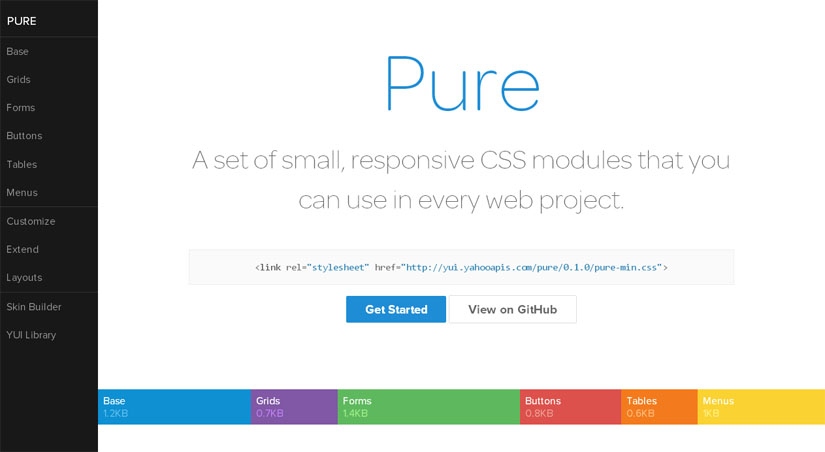
1. Pure : CSS Framework by Yahoo


Pure is a fresh one that is created by Yahoo!. It uses Normalize.CSS anddoesn’t use any JavaScript but only HTML-CSS. The framework is built with responsive layouts in mind and has styles for typography, grids, forms, buttons, tables and navigation. Markup used is very simple and the whole framework is pretty lightweight(5.7KB minified and gzipped).

2. Fries : For Android Like UIs


Fries is a solid HTML-CSS-JS framework for creating Android-like UIs both for real-world usage and prototyping. The framework has all the major components like forms, action bars, lists, buttons, spinners or tabs. It is also optimized for PhoneGap and can be easily converted to a native app.

3. Appium : Test Automation Framework for Mobile Apps


Appium is an open source framework which helps automating mobile app testing from any language and any test framework, with full access to back-end APIs and DBs from test code. It works for both iOS + Android apps and tests can be written with Java, Objective-C, JavaScript, PHP, Python, Ruby, C#, Clojure, or Perl. The framework is Mac OS X only and requires Nodejs to run.

4. Skel.js : Framework for Building Responsive Layouts


Skel.js is a tiny JavaScript framework (~6kb gzipped and minified) thatsimplifies building responsive layouts very much. It has a JavaScript-powered and 12-column grid system that can handle any type of complex layouts + has easy-to-understand rules. Managing breakpoints is just about adding the width ranges in the options of the skel.js‘ main function.

5. Fitgrd : Responsive Grid System


Fitgrd is not a framework. It’s a solid foundation to build up your own responsive website. It is designed for rapid prototyping, but also runs well in production environments. This grid system is perfect for advanced web designers who don’t want to have their pages look like “bootstraped”. Everything but the grid is up to you and gives you the ability to save a lot of dispensable code.

6. Kartograph : Framework for Interactive Maps with SVG

Kartograph is a simple and lightweight framework for building interactive map applications without Google Maps or any other mapping service. It was created with the needs of designers and data journalists in mind. Actually, Kartograph has two libraries. One generates beautiful & compact SVG maps; the other helps you to create interactive maps that run across all major browsers. If you already have the SVG data (for ex: any drawing can be converted to SVG with Adobe Illustrator), only the JavaScript library can help too.

7. iio Engine : Open Source Framework for Building HTML5 Apps


iio Engine is an open source framework for creating HTML5 applications with JavaScript and canvas. The framework is lightweight (45kb) and packed with a debugging system+ cross-platform deployment engine. It doesn’t require any JS frameworks and can work side-by-side with Box2D. iio Engine’s website provides a full documentation and many examples to simplify development.

8. Markup Framework


Markup Framework, a fresh one, is a collection of layouts, widgets, typographic styles and other UI components which can be used as a base for any web project. It is mostly HTML-CSS with very few JavaScript and focuses on providing the base/skeleton rather than the look/design. The framework includes multiple style choices for typography, forms and UI widgets. Also, there are many ready-to-use layouts (with mobile-first approach), a flexible grid and CSS
reset.

For more information, please visit : www.programmingyan.com


Wednesday, 6 January 2016

Questions To Ask While Choosing the Best PHP Framework

Questions To Ask While Choosing the Best PHP Framework


"Don't reinvent the wheel" is a popular adage and this is what programmers follow. The frameworks are the results. If you have already decided to use a framework for developing your next project, then chances are high that you would choose a specific framework that you are already familiar with. But before you start with it, are you sure whether it is the most appropriate framework for the task in hand?
Web frameworks had gained high popularity in the past few years and PHP frameworks simplify web coding tasks for the developers and free them from focusing their time on certain details that sets your website and business apart from your competitors.
Understanding the PHP framework

The PHP framework offers reusable codes and a basic foundation to the developers to create new web applications. This helps to improve the productivity and create stable and functional sites. Most frameworks are based around the model-view-controller that ensure the separation of presentation and logic and help the programmers to write reusable and clean codes. A PHP web development company in India can easily help to create refined and polished versions of the manifestation of the codes in the application.
So if you are a PHP ninja or working with PHP project outsourcing companies, then you may at times wonder about the options that are there and the framework that is best for you. But the answer to your question depends on a few factors and here in this article we will discuss the questions that you should ask before choosing a PHP framework.
What is the prime objective of your application?
Type of website: The first thing that you should consider is whether you want to create an ecommerce business, a messaging platform, a social community or a directory? In case you are proceeding with an ecommerce project, then you may need to choose a framework that offers some ready libraries with proven extensions that deal with credit card processing. In case for a messaging platform, you may need multiple servers and databases for faster connectivity and load balancing.
Work portability: If you want to hire a PHP developer who can work dedicatedly on your project, then choosing a PHP framework that allows him to carry the work anywhere irrespective of the location is important. In this way he will be able to work for you and stay connected at the same time maintaining the site or debugging becomes easy and less fussy in critical situations.
Framework that can be easily enhanced if needed: PHP web application development is easy when the developers use thin frameworks with plugins or any other features that can be integrated or detached from the application according to the needs. This increases the flexibility of the application.
The hosting environment: Some PHP frameworks need additional software or module installation on the server. A lightweight framework which is highly portable and self contained may not offer the best functions for large information processing or serious data manipulation. Some frameworks are best with MySQL while some work with the key value and document store database. You can choose the best suitable for your project.

 For more information, please visit: www.programmingyan.com

Tuesday, 5 January 2016

The World Market is Entirely Captured by Android

The World Market is Entirely Captured by Android


A humongous 877,885,000 android units were sold within the year 2013, as per the Gartner inc. that is an American info technology analysis and consolatory firm. Today, over 1,000,000 mobile devices, utilized in higher than one hundred ninety countries, are powered by android OS! Thrilling! Isn't it? Being a foremost platform for applications, games, and different digital contents, android is attracting flock of users on an everyday basis. it might not be an exaggeration to mention that this open marketplace has conjointly outshined the innovations of different market players, who pioneered the Smartphone revolution, like Microsoft's Windows similarly as Apple's iOS and Mac OS.
An Open Marketplace For every kind Of Applications
Android uses Google Play as a base and a premier marketplace for marketing, distributing and downloading apps. Google Play comes preinstalled on all the android devices and an app that's revealed on that reaches a good variety of android users all round the world. An apps developer will publish something that he desires and as frequent as he desires thus as to reach his targeted audience. Apps is simply distributed generally to all or any markets and devices or may be sold to specific segments, devices or hardware ranges. These apps may be classified as priced, free or with in-app subscriptions that has helped the developers to monetize everything for highest engagements and revenues for his or her business. Google Play merely builds visibility and engagement of the apps similarly because the brands. All the apps that attract a large client base and rise in quality are placed by Google Play within the weekly "top" charts, rankings and promotional slots.
Global Partnerships
The fastest-growing mobile OS, android has world partnerships with open-source Linux community similarly as higher than three hundred software, hardware and carrier partners. The expansion in app consumption may be attributable to its openness that has created it a favorite of each developers and shoppers. With these international partnerships, the boundaries of hardware and software system are continuously being pushed by android to introduce new capabilities to each users and developers.
A Powerful Development Framework
The single application model of android provides best-in-class app experiences and helps within the development of apps generally to lots of users and a large vary of devices right from phones to tablets. Android comes with android Developer Tools that helps in developing an app with efficiency. It offers full Java IDE together with advanced options for development, debugging, and packaging of android apps. With the help of Java IDE, an app may be developed on any android device. Also, virtual devices may be created to emulate all hardware configurations.

 For more information, please visit : www.programmingyan.com

Monday, 4 January 2016

How is Mobile Technology Impacting the Food and Beverage Supply Chain?

How is Mobile Technology Impacting the Food and Beverage Supply Chain?
Mobile technology is positively affecting businesses across the globe, allowing for real-time data transmission, instant collaboration, and the ability to access key business metrics from just about anywhere. With mobile supply chain applications, business owners in the food and beverage industry have greater insight into their everyday workflow – accessing data on the fly, enabling them to make better decisions faster. Let’s take a look at just how mobile technology is giving the food and beverage industry a leg up.

Real-Time Data Management
Real-time information means no duplicate data entry, better performance, and an increase in productivity. The ability to communicate information immediately, through mobile supply chain applications, allows staff members to simplify processes and catch issues before they escalate. With these applications, information no longer has to be collected and dispersed throughout singular points of contact. This freedom of information access allows for quicker reaction times, better management, and a more efficient supply chain. 
Access from Anywhere
‘Access from anywhere’ are three little words that can revolutionize a business. Mobile management helps staff members increase productivity, and provides them with remote control over activities. With effective mobile supply chain software, business owners and staff can move about without losing sight of key metrics. This allows business executives to keep an eye on supply and demand, and make decisions to keep a balance between the consumer’s needs and the producer’s capacity.
Empowered Workers
Mobile management helps staff members increase productivity and allows them remote control over important activities, whether they are on location or off. With information that can be accessed by every individual throughout the mobile supply chain, every staff member has the ability to make adjustments, disseminate data, and respond to changing conditions. This empowers the entirety of the team, and takes the onus off of singular individuals to ensure that overall productivity is maintained. With access to these applications through smartphones and tablets, workers are able to manage, organize, and communicate data while they are on-the-go.
Cost Effectiveness
Mobile supply chain software allows for better visibility of the entire production process, offering better efficiency and control on inventory, delivery, and tracking. The ability to track a product from processing to customer delivery allows businesses to streamline workflow and ensure maximum control over costs. With the ability to provide more reliable service, communicate tracking data to the consumer, and gather electronic signatures and digital images, much of the supplier-to-consumer information can be communicated effortlessly and automatically.   
Better Compliance
Compliance is an important facet of a healthy food and beverage supply chain. Mobile apps can help both consumers and business owners verify compliance with best practices, regulations, and industry standards. With the ability to keep contact with drivers and monitor deliveries, compliance and safety standards can be reviewed. The concrete data provided by mobile supply chain software allows compliance to be easily proven and delivered to both regulatory bodies and the general public. 

Software applications allow food and beverage distributors to keep a closer eye on the entirety of their business, from any location. This mobile management helps staff members increase productivity, and allows them remote control over activities. Better transparency and automated checks and balances help increase compliance; automated communication and reliable tracking helps increase cost effectiveness throughout the supply chain; access to data from anywhere empowers workers by allowing them to make informed decisions; and real-time data keeps all employees up to speed on every aspect of the supply chain, from initial production all the way to final delivery. 

For more information, please visit : www.programmingyan.com

Saturday, 2 January 2016

What Is Open Gaming?

What Is Open Gaming?

"Open gaming" describes a set of beliefs about the way people should make and play games.
Game designers and players who embrace open gaming believe that sharing, transparency, and rapid prototyping can lead to superior entertainment experiences.
How do open source principles apply to games?
Games and software are similar because they are both collections of rules. Just as software is really a set of rules that determines what is and is not possible for users to do with a computer program, a game is a set of rules that defines what players can and can't do in pursuit of a goal.
Open source software is software anyone can modify and enhance because its source code is publicly available (and because its creators have given everyone permission to alter it). Open source games are likewise games that players can adapt to fit their preferences. The open nature of these games allows players to build on designers' ideas.
Taking an open source approach to games means recognizing that the rules governing what people can and can't do are arbitrary—they are not permanent, and people should feel free to tweak and tinker with them. Like writing laws, creating games is the practice of crafting the rules by which people can act. The same is true of writing software.
How do open source principles apply to digital games?
Digital games consist of multiple components, and open source principles can apply to each.
At the heart of modern digital games (like video games) is what programmers call a "game engine," a collection of software tools that game designers use to make video games by manipulating the sounds, the on-screen graphics, the "physics" of the world represented in the game, and everything else players see when they play those games. Using a game engine, programmers can create games for the specific devices players own (like the game consoles in those players' living rooms, or the mobile phones in their pockets). The source code for some of these engines (like the Blender Game Engine and jMonkeyEngine) is open; programmers are free to study it, modify it, enhance it, and improve it for the game designers that want to use it.
Digital games also consist of hardware, the physical devices people use to play games. Some gaming hardware is closed or proprietary; only its creators have the right to determine how that hardware can be built and how people can use it. Some manufactures prohibit players from modifying their gaming hardware. Other hardware is open. Manufacturers of open gaming hardware encourage players to examine and tinker with their devices if they are curious about how they might enhance them. For example, makers of the OUYA, a video game console that features the Linux-based Android operating system, specifically designed the console so that players could take it apart and study how it was assembled. Other gaming device makers have open-sourced the designs for their devices so that others can learn from and even manufacture them. Creators of Pandora, an open source handheld video gaming console, have posted designs for the unit's circuit boards online so people can use those plans to build their own open gaming hardware.
Digital games involve artwork in the form of graphical icons, scenery, and depictions of characters and creatures that players see when they are interacting with these games. These graphical elements of digital games are a form of intellectual property; they belong exclusively to the person (or group of people) that created them. In recent years, some artists have begun licensing their graphics so game designers can incorporate those graphics into their games without fear of violating copyright law. In 2012, Creative Commons, OpenGameArt, and the Free Software Foundation hosted the Liberated Pixel Cup, a contest that rewarded graphic artists who created gaming resources open for anyone to use.
Do open source principles only apply to digital games?
No. People who design non-digital games like board games and card games can also do so according to open source principles. For example, some game designers will release their materials under CreativeCommons licenses so players can download, replicate, and, in some cases, even modify them.
Designers may do this because they feel it makes discovering their games easier. Potential players are more likely to try unfamiliar games if they can access and acquire the materials they need to play those games with little difficulty—or if they are able to receive copies of games from friends who recommend them.
Designers might also release their games under Creative Commons licenses because they feel that doing so helps promote their games' longevity. They feel that players who can freely share game materials are more likely to continue playing those games in the future (and to introduce those games to others).
Occasionally game designers use rapid prototyping and crowdsourcing techniques to help them improve their games. They make their game design processes transparent so that would-be players can help shape their games' final forms. Designing a game involves play testing it by asking players to play the game and offer their feedback on it. People who make games tend to playtest their games as much as possible before they finalize their designs. By opening the design process, creators can more easily gather large groups of playtesters and hone their products more quickly than they could if the design process was closed or conducted in secret.

 For more information, please visit : www.programmingyan.com

Friday, 1 January 2016

PROGRAMMING LANGUAGES TO LEARN THIS NEW YEAR

PROGRAMMING LANGUAGES TO LEARN THIS NEW YEAR

With the inception of new year , every one of us is affiliated , brimming with hopes and dreams. With so much energy and passion brewing up , let’s focus it today to learn something easy and quick!
Programming languages, no matter how bugging or interesting they may sound  , people have to deal with them at some point of their life irrespective of their profession , passion or career goals. Everyone needs a website or an app or security covering up their data or software to make their life easy.
So calm down and go ahead , read up 5 minute article to get cool overview of 5 hot programming language of today!(May be you just like them and want to get your hands dirty too!)
1. C
This language claims to be the mother of almost all modern day languages and truly has the largest impact on computation than all other programming languages till date. Invented by Dennis Ritchie due to the shortcomings of B language , this language is powerful and shouldn’t be messed with.
Its a low level language , meaning its closer to what machine understands. Hence this language is used for low level code such as OS kernels , device drivers etc.
printing “Hello” :
#include<stdio.h>
int main()
{
printf(“Hello”);
return 0;
}

2. Python
Python is said to be the most hassle free language and is best for a beginner to absorb in the programming environment.Its greatest strength is its simple syntax yet its wide range of uses.Its code tends to be self-documenting and thus used quit flexibly by programmers.
Some argue that its best used as a gluing language (joining components of different language) and not a language for mature programming. But it certainly has a rich built in library and many other features which gives python developers an evergreen feel-young feeling!
Just “Hello”
print(“Hello”)

3. Java Script
Without a slightest doubt Java Script has marked itself to become the most popular language today. With growing number of projects on Git-hub and with sharp incline of developers in this field its a must learn for anyone interested in web development.

It has numerous advantages like OOPs(Object oriented programming), similarity of syntax with java(though very minute) , asynchronous smooth response), re-usability  It was originally made to be a client side language but gradually induced into server side with the help of some frameworks like NodeJS. Some argue that there are better languages like coffee script but the results are yet to gain our interests!

Wanna say  “Hello” ?
<html>
<body>
<script>
document.write(“Hello”);
</script>
</body>
</html>


4. PHP
Most widely used server side language, PHP stands apart to become the language behind world’s most powerful websites like Facebook.Its behind the most popular blogging tool and content management system like WordPress , drupal and OwnCLou.

It flaunt features like form submissions, user sessions,cookies and loose data types. PHP is designed to work in single request single response mode. It blends with HTML , Java script etc very well and are together very suitable for coding in a number of software patterns.
hands on it time! “Hello”
<?php echo “Hello”; ?>

5. Java
The ‘lingua franca’ or the common language of programming , Java is a pet tamed by all with love. WORA (Write Once Run Anywhere) status of this language comes from its platform independent nature from the use of JVM and not directly communicating with the machine or underlying architecture!
It’s core OOP foundation, easy trouble shooting great garbage collector , goodbye pointers and many such welcoming features are the major attraction. Famous for its ultra rich built-in library , this language also lays the foundation for android though being an Oracle product.
okay!show me some code..
class fun
{
public static void main(String args[])
{
System.out.println(“Hello”);
}
}

So, here was your list of programming languages in a nutshell because probably 20 years from nowsome say those who don’t understand programming languages, would be considered illiterate! But who knows may be you have your own website till then now that you have read this. So cheers and best of luck.

For more information, please visit : www.programmingyan.com